SMS-DB
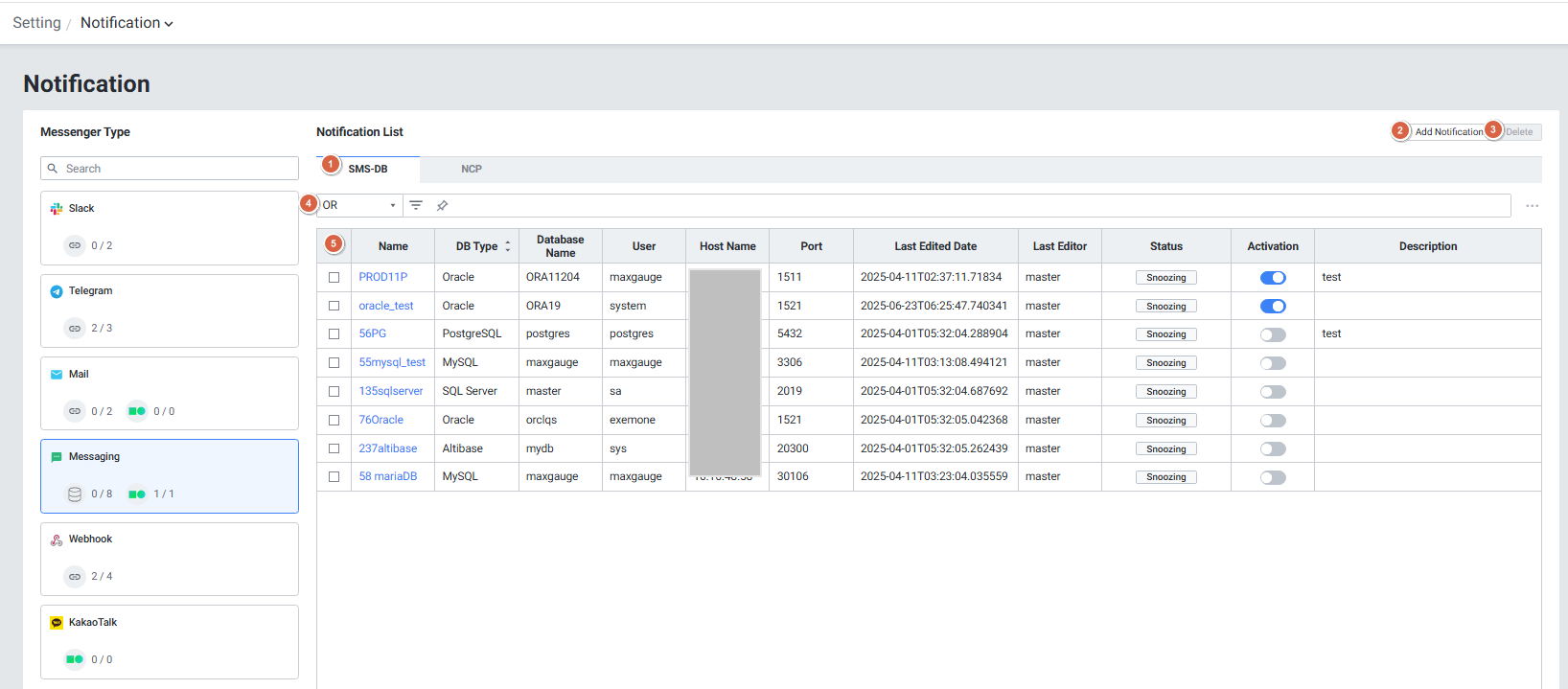
| 순번 | 항목 | 내용 |
|---|---|---|
| 1 | SMS-DB | 연동에 대한 설정 내용 |
| 2 | Add Notification | Add Notification 팝업창이 열립니다. |
| 3 | Delete | 선택된 Notification을 삭제합니다. |
| 4 | Filter | 필터 조건 따라 Notification 목록을 보여줍니다. Or이나 And 조건으로 선택 가능합니다. |
| 5 | Notification List | Notification 목록을 보여줍니다. |
● Grid (SMS-DB)
| 순번 | 항목 | 내용 |
|---|---|---|
| 1 | Name | Notification이름 |
| 2 | DB Type | DB 종류 (Oracle, Mysql, PostgreSQL, SQL Server, Altibase) |
| 3 | Database Name | DB 이름 |
| 4 | User | DB 접속 user |
| 5 | Host Name | DB IP |
| 6 | Port | DB 접속 Port |
| 7 | Last Edited Date | 최근 수정 일자 |
| 8 | Last Edited | 최근 수정자 |
| 9 | Status | 연결 상태 표시 |
| 10 | Activation | Notification 활성화 여부 (토글) |
| 11 | Description | 등록된 Notification 상세 설명 |
● Add Notification SMS-DB용 데이터베이스를 연동하기 위한 기본 정보 입력하는 화면입니다.
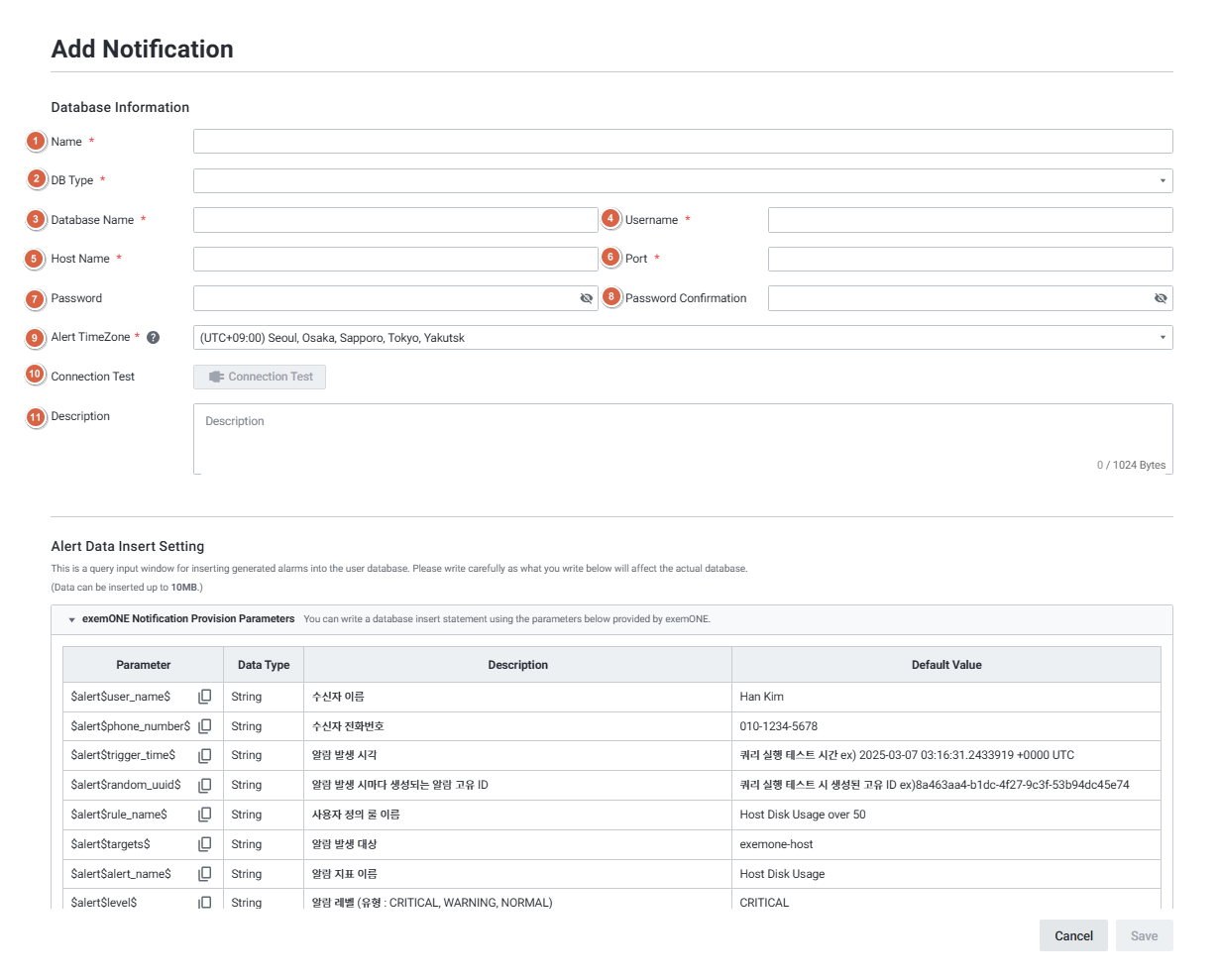
| 순번 | 항목 | 내용 |
|---|---|---|
| 1 | Name | Notification이름을 입력합니다. |
| 2 | DB Type | 데이터베이스 타입을 선택합니다. Oracle(기본값) Mysql PostgreSQL SQL Server Altibase |
| 3 | Database Name | DB 이름을 입력합니다. |
| 4 | User Name | 사용자 이름을 입력합니다. |
| 5 | Host Name | 호스트 IP를 입력합니다. |
| 6 | Port | Database Port 번호를 입력합니다. |
| 7 | Password | 비밀번호를 입력합니다. |
| 8 | Password Confirmation | 비밀번호를 확인합니다. |
| 9 | Alert TimeZone | 알람 발생 시간의 표준 시간대를 설정합니다. |
| 10 | Connection Test | 필수 정보를 모두 입력하면 버튼이 활성화됩니다. 데이터베이스 연결이 가능한지 테스트를 실행합니다. |
| 11 | Description | Notification 상세 설명을 입력합니다. |
- Alert Data Insert Setting
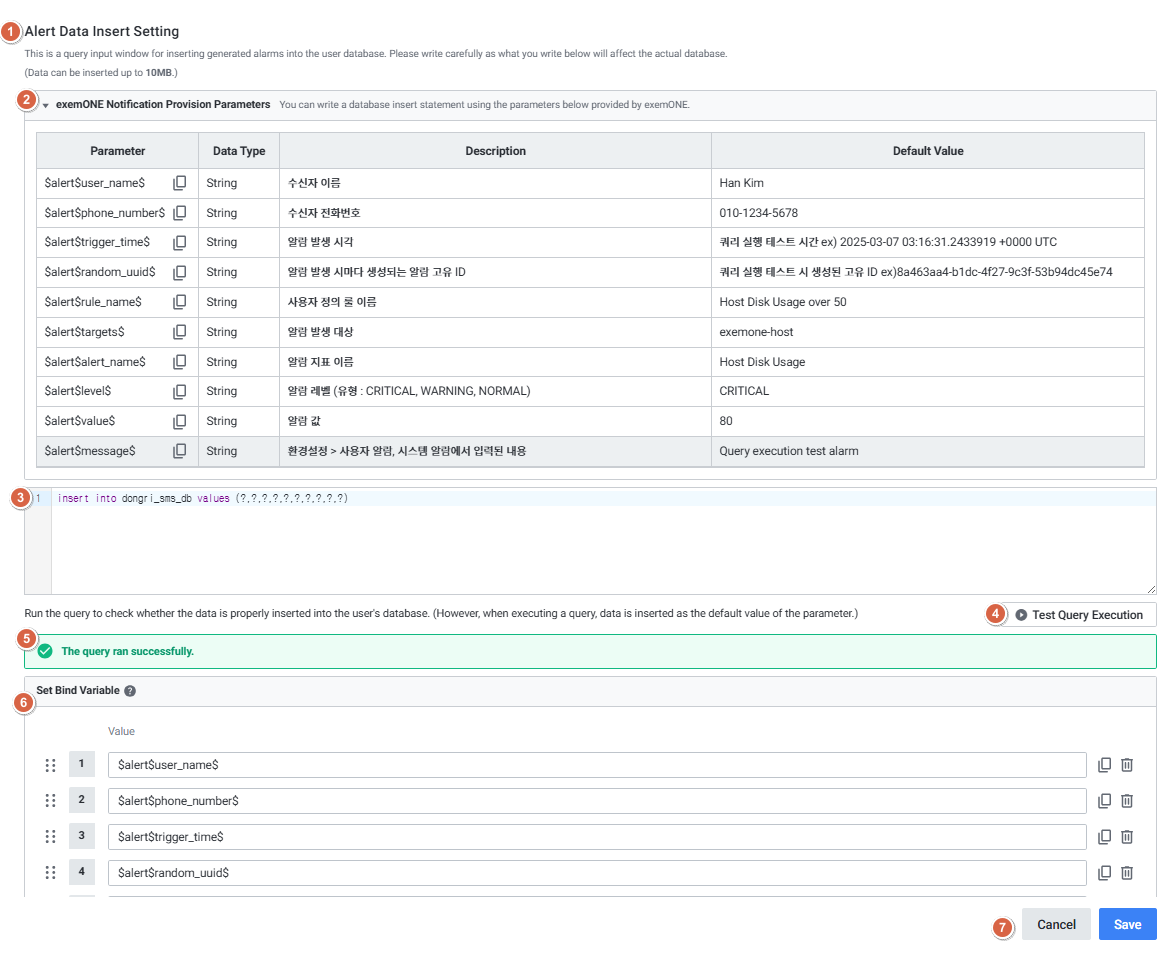
| 순번 | 항목 | 내용 |
|---|---|---|
| 1 | Alert Data Insert Setting | SMS-DB에 알람 정보를 삽입하기 위한 쿼리문을 작성하는 영역입니다. |
| 2 | exemONE Notification provision parameters | 엑셈원이 제공하는 아래의 파라미터를 활용하여 쿼리를 작성할 수 있습니다. |
| 3 | Query | 알람 정보를 삽입하기 위한 쿼리를 입력합니다. |
| 4 | Test Query Execution | 작성한 쿼리를 실행 하는 테스트 버튼 Database Information > Connection Test 성공 시 버튼이 활성화 됩니다. |
| 5 | Test Result | 작성한 쿼리를 실행한 후 결과를 성공, 실패 여부를 확인 할 수 있는 영역입니다. |
| 6 | Set Bind Variable | 바인드 변수 설정 방식으로 쿼리를 입력하는 경우에 설정합니다. |
| 7 | Cancel / Save | Add Notification을 취소 / 저장 할 수 있습니다. |